 Member Sponsored Content
The following article is brought to you by our premium members. These articles are co-authored with our education & action partner, Mobile Internet Resource Center (MIRC), who provide in-depth content and independent analysis on all things mobile internet.
Consider joining our membership for full access and to be part of the conversation in our support forums. Members also receive premium discounts on equipment, data plans as well as upgraded shipping! Learn more...
Summary
This article explains how to purchase top up data for RoamLink Flex plans through the RoamLink portal found at portal.roamlink.com. This feature applied to all RoamLink Flex plans only. Other plans (Like Core) do not include this feature. If you are not on a Flex plan and would like to change to one, reach out to info@mobilemusthave.com.
Explanation
First, log in to portal.roamlink.com. Be sure to use the email assigned to your subscription, otherwise your plan will not appear on your dashboard.
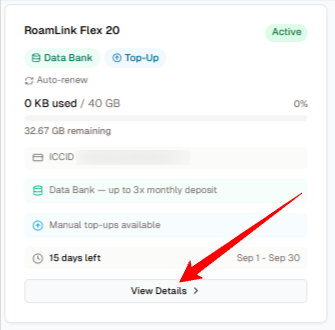
On your dashboard, identify the plan you would like to purchase top up data for and click "View Details":
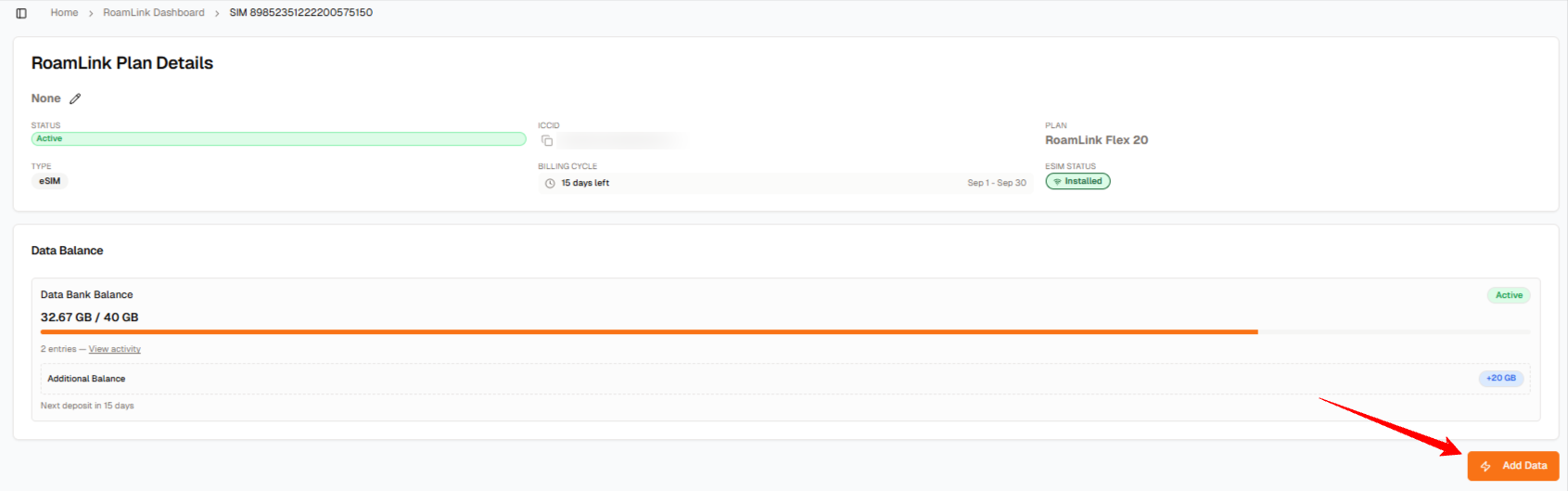
In the next page, click "Add Data":
In the next page, you will select how much data you would like to purchase. Your options are 20gbs, 40gbs, 60gbs, or any custom amount 20gb or higher:
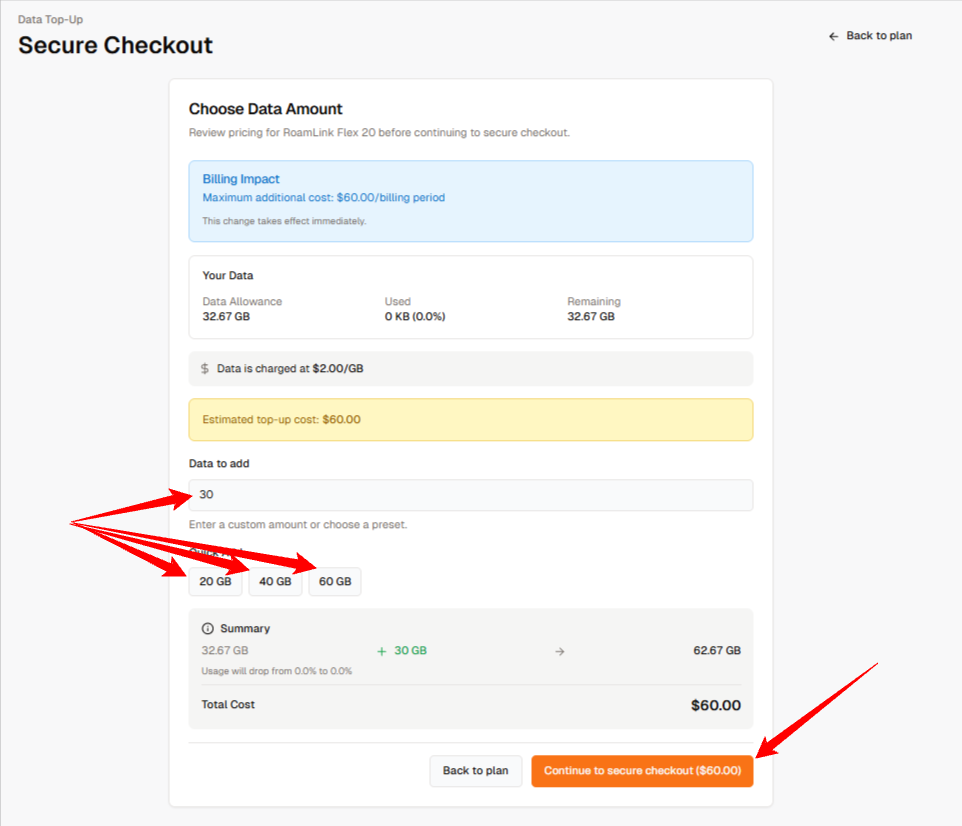
Finally, just click "Continue to secure checkout" and finalize your order from that page! Your data will be applied within 5 minutes of your purchase.
Need More Help? Consider Joining Our Membership & Support our Community
MMH Explore members can join the conversation and gain access to our support forums located within the Mobile Internet Resource Center. Senior members of MobileMustHave's Technical Staff moderate the MobileMustHave.com Support Forum and tackle more advanced configurations, troubleshooting, and general advice.
In addition, MobileMustHave hosts monthly live webinars on advanced topics. These sessions cover everything from the basics to the more nuanced areas of configurations on Peplink devices. Past Webinars have included deep dives into; SpeedFusion Connect Protect (Cloud), Outbound Policies, VLANs, and much more.
MobileMustHave and the Mobile Internet Resource Center have staff with decades of IT experience and are there to help you when you get stuck!
Thank you for being the best part of MobileMustHave.com!
Was this article helpful?
That’s Great!
Thank you for your feedback
Sorry! We couldn't be helpful
Thank you for your feedback
Feedback sent
We appreciate your effort and will try to fix the article