 Member Sponsored Content
The following article is brought to you by our premium members. These articles are co-authored with our education & action partner, Mobile Internet Resource Center (MIRC), who provide in-depth content and independent analysis on all things mobile internet.
Consider joining our membership for full access and to be part of the conversation in our support forums. Members also receive premium discounts on equipment, data plans as well as upgraded shipping! Learn more...
TABLE OF CONTENTS
- Member Sponsored Content
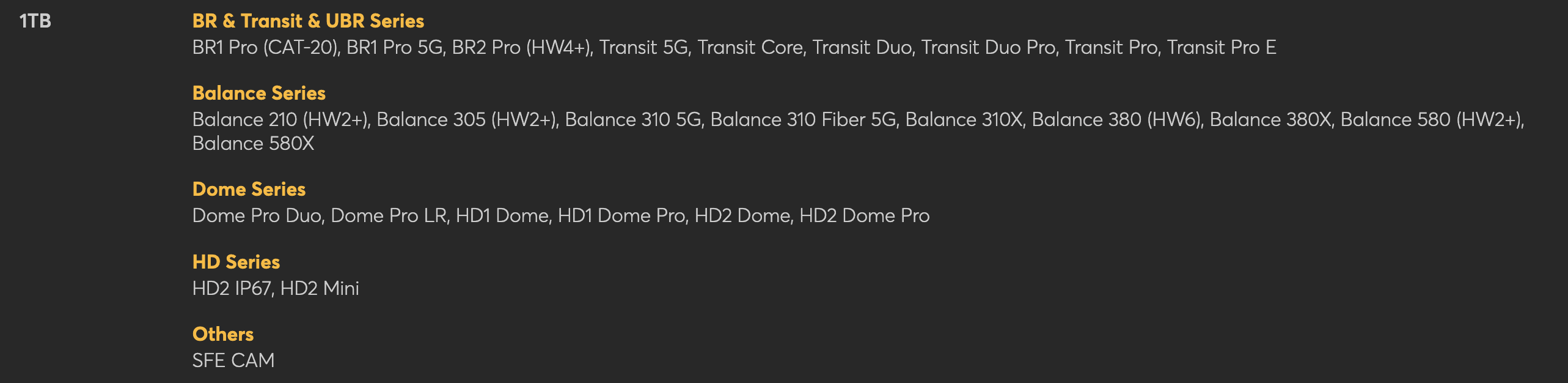
- Products Covered
- Article Summary
- Education
- Action
- Need More Help? Consider Joining Our Membership & Support our Community
Products Covered
Article Summary
What is SpeedFusion Connect?
Education
Peplink routers can combine multiple WAN connections into a single connection using a technology called SD-WAN (Software-Defined WAN). Peplink has branded their particular SD-WAN solution as SpeedFusion and has named the Peplink Cloud Hosted version "SpeedFusion Connect Protect." SpeedFusion, or any SD-WAN technology, utilizes multiple WAN connections in the form of a VPN tunnel to provide connectivity, usually out to the internet for most non-commercial use cases.
While Peplink devices can combine WAN sources such as Campground WiFi and Cellular connections into a single connection, the technology is generally best used with two cellular connections in a dual modem device or a single cellular connection in conjunction with high-speed satellite internet, such as Starlink.
Generally speaking, SpeedFusion is optimal for customers who have multiple WAN connections, and:
- Require reliable video-conferencing
- Are full-time, remote workers
- Value reliability over fast speeds
SpeedFusion is not needed for customers who:
- Have only one WAN source
- Use the internet mostly for casual browsing and streaming, and simple internet tasks
- Value sourcing the fastest speed available rather than bonding for reliability
- Do not want to pay for additional SpeedFusion Data
Please note that enabling Speedfusion on a single WAN connection will not provide any benefits other than VPN-like security to the connection and may slow down connections as additional hops are being added to the connection. Additionally, many streaming services like Netflix may not work over SD-WAN connections, including SpeedFusion. For more detailed information about the SpeedFusion service, please see this guide.
Additionally, with the purchase of your Peplink router, you receive 1 year of free PrimeCare warranty. This warranty includes 1 year of free SpeedFusion data to use as well. Depending on your Peplink router model, you will receive anywhere from 500GB to 2.5TB. To confirm how much data you receive with your purchase, please visit this link.

Additional Member Content Available

A host of articles are available to our members hosted by the Mobile Internet Resource Center:

Peplink Learning Center

 Some content is provided free of charge, members have full access as well as access to our pre recorded webinars on this topic. Learn More About Memberships...
Additional Content & Links from Mobile Internet Resource Center
- Optimizing Cellular Performance on Peplink Routers
- SpeedFusion Connect Guide & Member Webinar
- Peplink Multi-WAN Overview Guide
- Peplink SpeedFusion Cloud Relay Guide
- Combining Peplink and Starlink Guide & Member Webinar
- Peplink Virtual WAN Guide
Action
To purchase additional SpeedFusion data, outside of the included amount in your PrimeCare warranty, please take a look at plan options available on our website here.
With assistance with configuring SpeedFusion connect, please reach out to our Support team at support@mobilemusthave.com
Need More Help? Consider Joining Our Membership & Support our Community
MMH Explore members can join the conversation and gain access to our support forums located within the Mobile Internet Resource Center. Senior members of MobileMustHave's Technical Staff moderate the MobileMustHave.com Support Forum and tackle more advanced configurations, troubleshooting, and general advice.
In addition, MobileMustHave hosts monthly live webinars on advanced topics. These sessions cover everything from the basics to the more nuanced areas of configurations on Peplink devices. Past Webinars have included deep dives into; SpeedFusion Connect Protect (Cloud), Outbound Policies, VLANs, and much more.
MobileMustHave and the Mobile Internet Resource Center have staff with decades of IT experience and are there to help you when you get stuck!
Thank you for being the best part of MobileMustHave.com!
Was this article helpful?
That’s Great!
Thank you for your feedback
Sorry! We couldn't be helpful
Thank you for your feedback
Feedback sent
We appreciate your effort and will try to fix the article