Table of Contents
Products Covered
MobileMustHave Wireless direct data plans:
- RUnlimited
ONLY FOLLOW THIS ARTICLE IF YOUR PLAN PURCHASED EXACTLY MATCHES THE PLAN LISTED ABOVE
Summary
If you are interested in using your Peplink modem on a MMH Wireless RUnlimited Cellular Data Plan, some settings may need to be changed to have the modem negotiate with these networks. An APN is like a username and must be updated to tell the carrier what network you should be on. Failing to update this will result in you not being able to connect. You must update these APN settings for your data plan to connect and function properly.
Entering the APN
Navigate to the Dashboard tab and select the cellular details button of the modem you wish to add this data plan to.

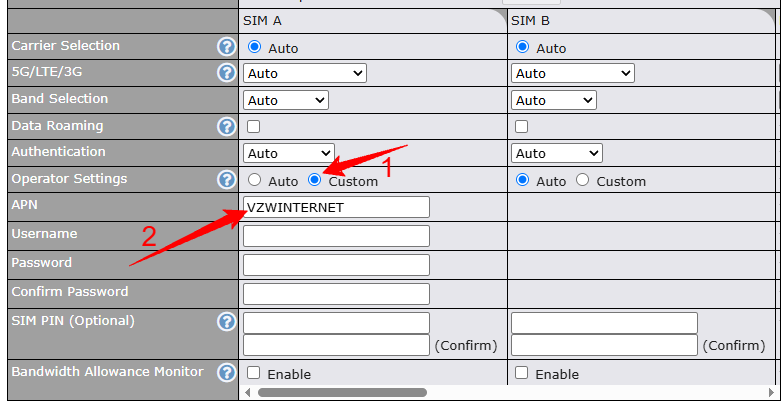
Scroll down Cellular Settings, select Custom under Operator Settings. Make sure to select the proper SLOT A or B based on where your MMH sim card is located. Change the section corresponding to the correct SIM card to custom. Then, enter the following into the APN field: VZWINTERNET
Requesting Assistance
If you feel you are not getting anywhere or there is another issue you can always reach out to our team directly by initiating a ticket here on the SUPPORT PORTAL or by emailing info@mobilemusthave.com
Thank you for being the best part of MobileMustHave.com!
Was this article helpful?
That’s Great!
Thank you for your feedback
Sorry! We couldn't be helpful
Thank you for your feedback
Feedback sent
We appreciate your effort and will try to fix the article